

You're both online in EA SPORTS FC 27, you can see your friend's account and yet the match invitation won't go through. Before blaming your router or reinstalling the game, check the most common compatibility question: are you playing versions in the same cross-play console-generation group? A PS5 and a PS4 do not become compatible merely because both are PlayStations, and Nintendo has separate rules.
EA groups PlayStation 5, Xbox Series X|S and PC together for supported cross-play, while PlayStation 4 and Xbox One form an older-generation pool. EA Connect handles friend invitations and party lobbies, but a lobby still cannot override generation, mode or cross-play settings restrictions. Equally important, cross-play is not cross-progression: playing alongside a PC friend doesn't mean an Xbox or PlayStation Ultimate Team club follows you across brands.
This source-based FC 27 guide walks through the settings, supported-device examples, EA Connect invitations, The Grounds parties, Nintendo Switch/ Switch 2 and the nuances of moving FUT progress between console generations. It uses EA's current cross-play, EA Connect and Nintendo Help pages rather than older community guesses or promises about incompatible game saves.
Cross-play and cross-progression solve different problems
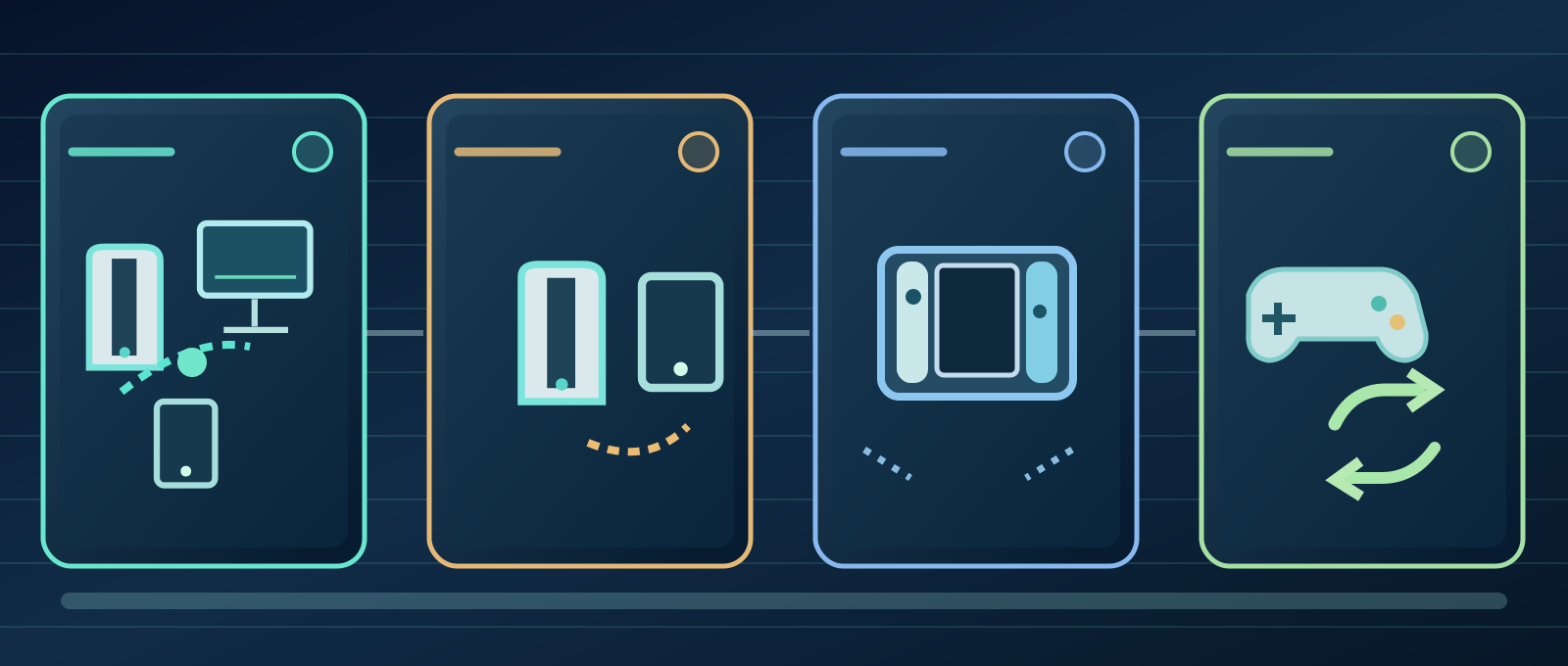
- PS5, PC & Xbox Series
- PS4 & Xbox One
- Nintendo Switch
- Cross-progression
- PS5 + PC + Xbox Series X|S are one pool; PS4 + Xbox One another.
- EA Connect manages invites, but mode and generation still control joining.
- Nintendo Switch/2 do not cross-play with PlayStation, Xbox or PC.
- Cross-progression is limited by platform family, with a Nintendo FUT exception.
- Cross-play cannot be toggled during a live match.
Cross-play means players on compatible different hardware can participate in the same online activity; cross-progression concerns whether your existing game or mode progress can move when you change hardware.
Example: PC and PS5 users may play together in an eligible mode, but that does not establish that a PlayStation FUT club or Career save can be moved to Xbox or PC. Check each permission separately.
The newer pool: PS5, Xbox Series X|S and PC
EA explicitly identifies PlayStation 5, Xbox Series X|S and PC as its current-generation cross-play group. Supported multiplayer modes can therefore pair these machines when both players allow it.
Being in the same group is necessary but not sufficient. A particular mode, event or lobby may have separate eligibility rules, so verify that the activity itself offers the relevant cross-play invitation.
The older pool: PS4 and Xbox One
EA places PlayStation 4 and Xbox One together in a different generation pool. They can cross-play in compatible modes but aren't pooled with the current-gen versions.
The brand label isn't the rule. An Xbox One is not automatically eligible against an Xbox Series X|S merely because both are called Xbox.
Why PS5 cannot cross-play directly with PS4
EA says players on current-gen hardware such as PS5 cannot be matched against players using the older-generation version such as PS4 through the documented FC cross-play system.

If two friends own different console generations, inspect which FC 27 edition each actually launches and what versions are available for their systems. Do not claim changing a privacy slider or using a special DNS will remove EA's generation split.
Turn cross-play on in EA Connect
Cross-play is enabled by default when starting FC for the first time, according to EA. Open EA Connect from the main menu, then Social settings > Cross-play > Cross-play settings > Cross-play Enabled and select Yes; No disables it.
Both friends must permit the feature. Turning it on on only one account cannot make a disabled friend's lobby invite work.
Other menu routes and an important limitation
EA also documents Main Menu > Customise > Online Settings > Matchmaking Options and Ultimate Team > Settings > Matchmaking Settings. These lead to cross-play controls in the corresponding contexts.
Crucially, you cannot turn cross-play on or off during a match. Make the change before entering a competitive event and check again when you return to matchmaking.
Invite a friend or accept a lobby request
Open the EA Connect icon, normally near the lower-right of the main menu. When you are in the desired game mode, open Friends, choose an online friend and select Invite to lobby. Recipients open Game invites and select Join lobby or Decline.
Seeing a friend online proves that social presence is available, not that every lobby is compatible. Enter the mode and check its join rules before assuming the problem is a network outage.
Three official reasons an EA Connect lobby may fail
EA Connect lists three explicit restrictions: cross-play is off for you, cross-play is off for your friend, or the game mode does not support cross-play.
Additionally, verify generation eligibility: PC versus PS4 is an incompatible combination even when cross-play is enabled for both accounts. A friend request alone never changes the matching pool.
Which FC 27 modes allow cross-play?
EA references multiplayer in Football Ultimate Team, Clubs, Online Friendlies and Seasons, but **not every older cross-play mode list applies unchanged to every FC 27 variant**. Availability remains mode-specific.
Check the live mode description, game event and party menu. Supported Clubs or FUT activities can use EA Connect invitations within the compatible pool; don't advertise universal cross-play for every training, offline or special mode.
The Grounds has a specific generation group
EA's FC 27 The Grounds Help page says the playground supports cross-play between PC, PS5 and Xbox Series X|S, with Nintendo Switch 2 excluded. Joining friends involves a party and the activity queue.
If you and a friend appear in different Grounds worlds, use EA Connect invitations to join the same one before queueing. EA shows blue dots for club members and pink dots for party members in its world navigation guide.
Nintendo Switch and Switch 2 are excluded
Neither Nintendo Switch nor Nintendo Switch 2 supports the FC PC/PlayStation/Xbox cross-play network. But that does not mean Nintendo users have no online play: their ecosystem includes Seasons, FUT, Clubs and Nintendo friends.
Nintendo Switch Online subscriptions and matching Nintendo versions determine Nintendo multiplayer options; buying that subscription does not allow Switch to challenge a PlayStation 5.
Nintendo Switch 2 GameShare is something else
EA documents GameShare on Switch 2 for eligible Kick-Off play with a Nintendo friend, with certain supported arrangements allowing the other player to join without a separate game copy. Local Seasons has its own same-title/proximity requirements.
That is Nintendo sharing or local/compatible Nintendo social play, not cross-play against PC, PlayStation or Xbox. Don't promise that GameShare makes all FC modes freely shareable.
PS4 to PS5 progression has caveats
EA states that cross-progression can occur within a console platform family—for example PS4 to PS5 or Xbox One to Xbox Series X|S. Its page explicitly says PlayStation cross-progression is available in Ultimate Team only.
Because the help text also uses a broad same-platform example, don't extrapolate that every Career save, Clubs profile, purchased add-on or single-player statistic transfers without conditions. Verify the specific mode before replacing hardware.
Can a PlayStation club transfer to Xbox or PC?
EA says cross-progression is not supported between PlayStation and Xbox. Multiplayer cross-play is therefore not a shortcut to moving your FUT club, Coins, players or Career history across incompatible platform families.
Avoid third-party services promising guaranteed progress migration or shared currency and never supply passwords or account recovery codes to them. Those promises aren't the official progression system.
The Nintendo progression exception: Switch to Switch 2
The Nintendo-specific EA Help article confirms Ultimate Team cross-progression between Switch and Switch 2, while explicitly denying progression carryover from Nintendo to different platform families.
That shows why cross-play and cross-progression must stay separate: Switch players still cannot cross-play against PC, but the Nintendo generations have a documented Ultimate Team progression route.
A safe troubleshooting checklist
First write down both systems and which console-generation game edition each person launches. Check the group compatibility, then enable cross-play for both before entering a supported mode. Verify the friend invitation from EA Connect inside the correct lobby, plus any platform online access the mode requires.
If that still fails, collect the exact mode, hardware, version and non-sensitive error message for EA Help. Do not use spoofed input or account tools or disable account security to try to bypass a generation or social restriction.
Frequently asked questions and official references
Can PS5 play with PC? Yes in supported current-gen modes. PS5 with PS4? Not through direct cross-play. Is EA Connect friendship enough? No. Can Switch 2 challenge Xbox? No. Is progress moved from PS to Xbox? Not by the documented cross-progression system.
Sources & references5
Verified against EA's current Cross-play Help, EA Connect Help, Nintendo Switch article, FC27 The Grounds help and FC27 mode guide on October 8, 2026. Official