

Want to run a small eFootball competition with friends instead of relying on disconnected Friend Matches? KONAMI introduced Custom Tournament in version 6.0.0, allowing players to host or join knockout events for up to eight participants. A successful tournament still needs clear rules, realistic time slots and agreement about interruptions. This guide separates features confirmed by the publisher from optional organizer advice; it does not pretend a Zaplat external bracket-building tool is already live.
1. Understand the eight-player limit
KONAMI describes Custom Tournament as a user-hosted knockout event for at most eight players. That limit applies to the in-game mode, not necessarily to independent competitions organized through other systems. Do not assume it automatically creates a two-versus-two bracket or a larger championship.
2. Check players, accounts and platforms
Before inviting friends, ask everyone to update eFootball, ensure their account works and test their connection. Confirm any platform and regional requirements shown in their current game version. Availability on several devices does not automatically establish unrestricted cross-play between every platform.
3. Find the in-game Custom Tournament mode
Open eFootball and locate Custom Tournament, then choose the path for creating your own event rather than joining one hosted by somebody else. Menu positions and translated button names can change by version and platform; we avoid inventing a precise click-by-click path without verified screenshots.
4. Choose Dream Team or themed restrictions
The publisher says players can compete with their Dream Team or use custom themes that limit eligible footballers by league, club, nationality or region. Set and publish the intended rules before anyone enters. Changing team restrictions after some matches have taken place undermines consistency.
5. Agree on disconnections and match rules
Write down the supported match settings, deadlines and what will happen if a player disconnects or misses a scheduled slot. A replay policy is advice chosen by the organizer, not an automatic KONAMI rule claimed by this guide. Ask participants to accept the policy before the first fixture.
6. Draw a simple eight-person bracket
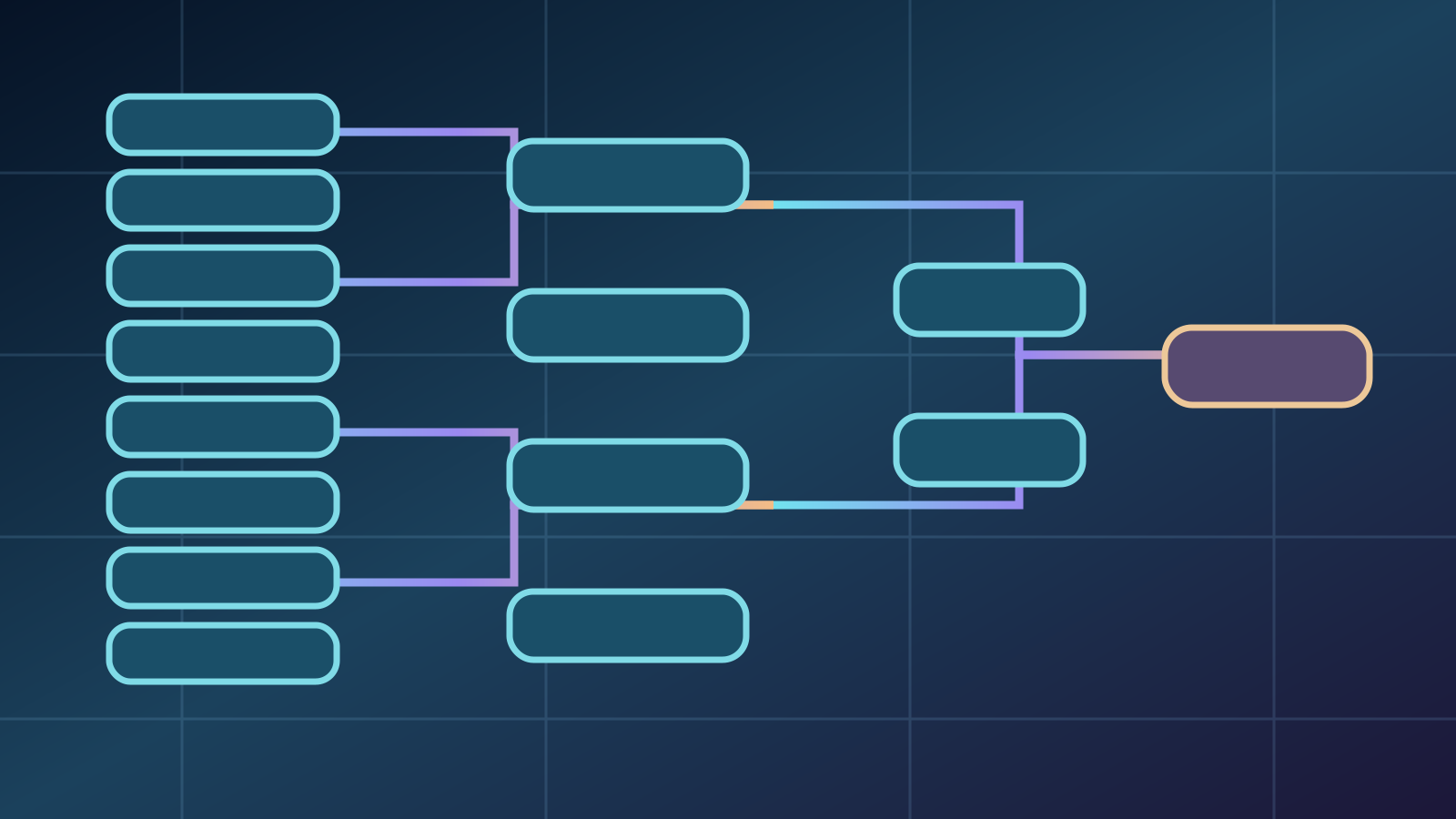
In a standard eight-person single-elimination example there are four quarterfinals, two semifinals and one final: seven matches spread over three rounds. Smaller groups may require settings that should be checked in the current game. Do not assume a specific bye system is available without testing it.
7. Invite entrants and confirm readiness
Use the invitation method actually displayed by the game and ask entrants to acknowledge the team restrictions and their assigned match time. We do not invent room codes or specific invitation buttons. Never request participants' KONAMI account passwords or one-time security codes to 'verify' them.
8. Use the host's live spectating controls
KONAMI states that the Tournament Owner can watch other participants' matches live and change camera perspectives. This can help an organizer follow a fixture, but it does not establish universal spectator access or an automatically public stream. Seek permission before broadcasting someone else's gameplay outside the game.
9. Track tournament progress notifications
Participants may keep playing other modes while enrolled and receive notifications as the bracket progresses. Check these notices and agree on an alternate communication method if a notification arrives late. A notification is not a substitute for an agreed time slot.
10. Record results and handle disputes fairly
Confirm the result after every match before moving to the next round. A consented result screenshot can help when participants disagree; avoid posting personal details. Apply the rules published before kickoff rather than changing them in response to a loss. We do not claim a built-in external appeals system exists.
When is Zaplat's community Cup a better choice?
Custom Tournament is suitable for a small private knockout event inside eFootball. Zaplat Gaming's Co-op Cup is a separately organized community competition with its own eligibility, prizes and teamwork rules. It is not necessarily an eight-player Custom Tournament, and creating a Zaplat account does not automatically host an in-game competition. Zaplat's planned tournament-builder tool is not a confirmed live feature.
Does hosting the mode cost money?
The official sources document the mode but not every account or purchase condition. Check your game before assuming a fee arrangement.
How many players can enter?
KONAMI specifies a maximum of eight participants in the Custom Tournament mode.
Can the host watch other matches?
Yes, the publisher describes live host spectating with camera controls.
Is it a guaranteed 2v2 format?
The cited notes do not establish that; do not confuse it with a Co-op community event.
Does it synchronize with Zaplat automatically?
No confirmed automatic integration exists; the community and competition listings are separate.